CCTV Camera Health Monitoring:
How to Check Hundreds of Cameras Without Manual Rounds
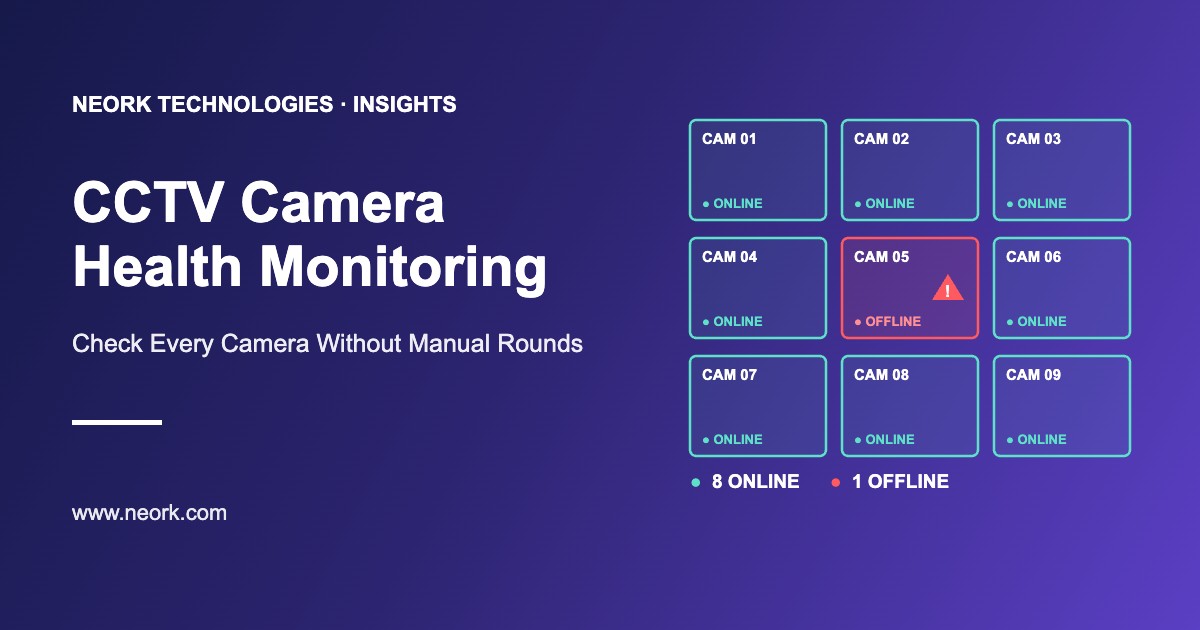
CCTV camera health monitoring is software that checks the status of every camera connected to your NVR and DVR devices. It shows in real time which cameras are online and which are offline or faulty, on one dashboard. This replaces manual camera rounds and helps your team fix problems before footage is needed.
Why CCTV cameras fail without anyone noticing
Most organisations find a broken camera at the worst moment: when they need footage of an incident. Security teams usually check cameras by walking around or opening each live view. With dozens or hundreds of cameras across several locations, this is slow and easy to skip.
Cameras go offline for many everyday reasons, and from the outside a broken camera often looks the same as a working one. Unless someone checks each camera regularly, the problem stays hidden.
Silent Failures
A camera can stop working without anyone noticing. Many problems are found only when footage is needed.
Real-Time Checks
Health monitoring checks the status of every camera connected to your NVRs and DVRs in real time, not once a week.
One Dashboard
For organisations with many sites, one central dashboard saves hours of manual checking.
Common reasons CCTV cameras go offline or fail
Cameras go offline for many everyday reasons. A health monitoring system shows these cameras as offline or faulty, so the team can find and fix the cause quickly.
Power Failure
The camera loses power and stops sending video.
Cable or Connector Damage
The video signal from the camera is lost.
PoE Switch or Network Problem
IP cameras drop off the network.
Camera Hardware Fault
The camera stops working or gives no picture.
Configuration Changes
The camera is no longer connected properly to the NVR or DVR.
"The best results come when health monitoring is paired with a clear maintenance process."
— KEY TAKEAWAY
How CCTV health monitoring works
A typical CCTV health monitoring setup follows five simple steps:
Connect to recorders
The software connects to your NVR and DVR devices and reads the status of every camera connected to them.
Real-time status updates
Camera status is updated in real time, so offline or faulty cameras are seen quickly.
One dashboard for all sites
Cameras across multiple locations are shown in one central dashboard.
Live streaming
The team can open a camera's live feed from the dashboard to check a problem.
Reports
Reports for all locations can be generated without visiting each site.
Manual checks vs automated health monitoring
Manual rounds depend on staff time and are easy to skip. Automated health monitoring gives the team a live view of every camera instead.
What Changes with Automated Monitoring
Who needs CCTV health monitoring
Health monitoring is most useful when cameras are many and spread out. Any organisation that must produce footage for safety, insurance or legal reasons benefits from knowing that every camera is working.
Hospitals & Campuses
Hospitals, schools and colleges with cameras spread across large buildings.
Retail Chains & Banks
Many branches where every camera needs to be working.
Factories & Warehouses
Large sites where one missed camera can mean missing footage.
Hotels & Facilities
Hotels, apartment communities and facility management companies with cameras across many locations.
How to choose CCTV health monitoring software
Use these questions when comparing CCTV health monitoring options:
Does it work with your NVRs and DVRs?
Check that the software supports the recorders already installed.
Can you see all sites in one view?
A multi-site dashboard shows every location together.
Are status updates real time?
Offline or faulty cameras should be visible straight away.
Can you open a live feed?
Live streaming from the dashboard helps the team confirm a problem.
Does it give useful reports?
Reports for management and audits.
Is there room to grow?
The option to add AI video analytics later on the same cameras.
How Neork's CCTV Health Monitoring Software helps
Neork Technologies, a software company at Infopark, Kochi, builds CCTV Health Monitoring Software that monitors the status of every camera connected to your NVR and DVR devices. It gives real-time status updates, detailed dashboards and live streaming, so security teams spot offline or faulty cameras quickly. Organisations with multiple locations can manage all cameras from one dashboard and generate reports without visiting each site.
The same cameras can later be used for AI video analytics, turning footage into searchable events and alerts. Read more in the guide to AI video analytics for business and IoT predictive maintenance.
Get started: want to know how many of your cameras are working right now? Contact Neork Technologies for a demo of CCTV Health Monitoring Software.
FAQ (Frequently Asked Questions)
What is CCTV health monitoring?
It is software that checks the status of every CCTV camera connected to your NVR and DVR devices and shows offline or faulty cameras in real time.
Can I monitor CCTV cameras at multiple locations from one place?
Yes. A central dashboard shows the status of cameras across all sites, so there is no need to visit each location to check.
Do I need to replace my existing cameras?
Health monitoring works through the NVR and DVR devices your cameras are connected to. Check compatibility with your recorders before starting.
How is this different from normal CCTV software?
Normal CCTV software is mainly for viewing and playing back video. Health monitoring focuses on whether every camera is working, so offline or faulty cameras are spotted quickly.
How often is camera status updated?
Status is updated in real time, so problems are seen without waiting for the next manual round.
Ready to Work Together?
We'd love to hear about your project and discuss how we can help bring your vision to life. Get in touch with us today to start the conversation.
